
Back to Home
Workflow Showcase • Motion Drafting Path
Product Walkthrough Screenshots
Motion Drafting In Action
Browse actual application screenshots showing the end-to-end motion drafting flow — from initial case setup to 28-line California pleading paper.
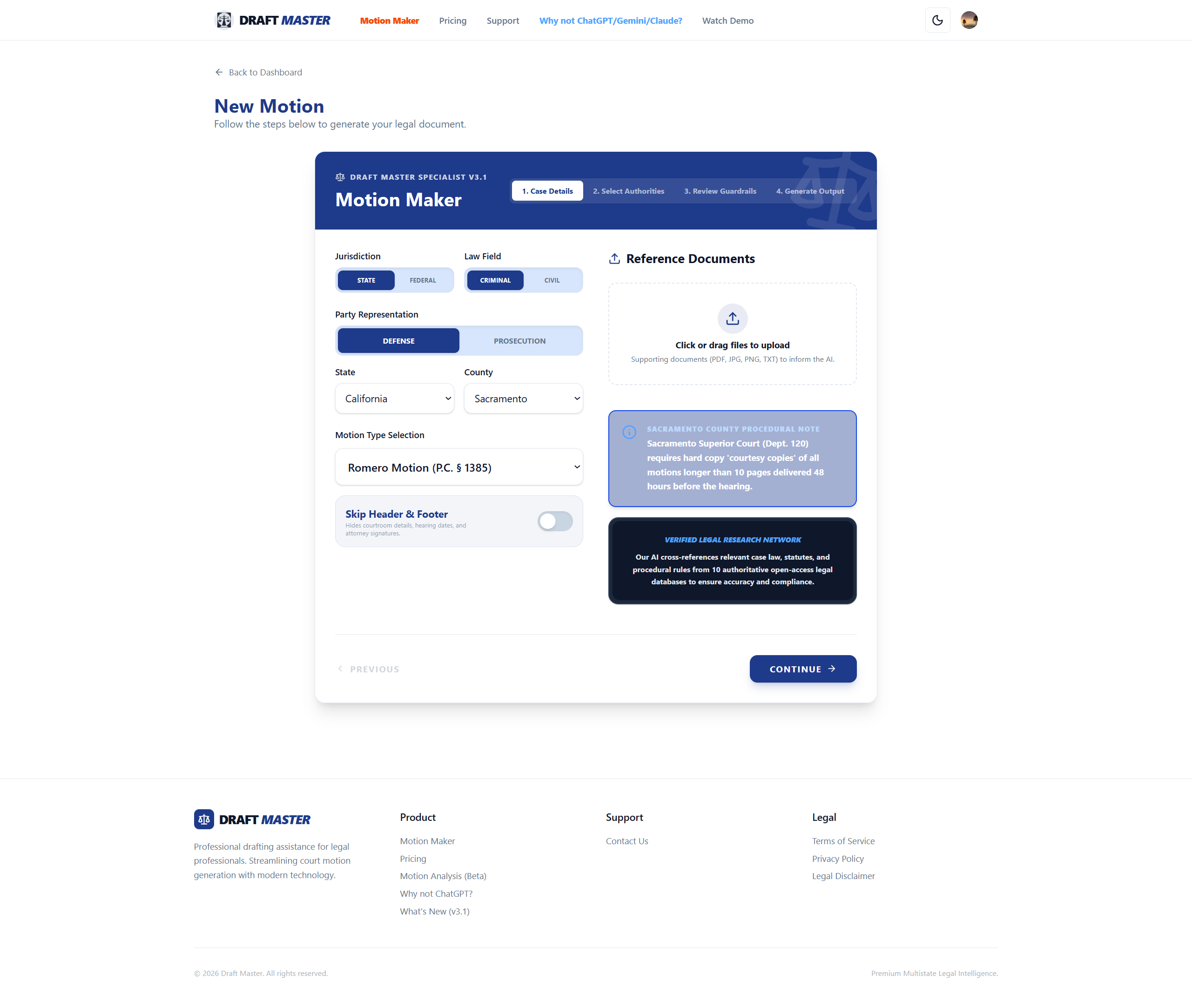
Step 1 of 5: Case Intake
Jurisdiction, Venue & Discovery Upload
Selecting Court Jurisdiction and Ingesting Reference Exhibits
Begin by selecting your jurisdiction (California State Superior Court or Federal District Court), county venue, and specific motion type. Upload supporting discovery documents, police reports, or witness transcripts into the dropzone where pre-flight safeguards inspect for confidential identifiers.
Key Screen Highlights:
All 58 California Counties pre-loaded with local procedural guidelines
Specialized templates for Criminal Defense and Civil Litigation
Multi-format exhibit dropzone supporting PDF, Word, and text transcripts
Pre-flight confidentiality safeguards protecting client information
All Workflow Screenshots:
Ready to Draft Your Motion?
Experience California SB 574 compliant drafting, 28-line pleading paper, and amended CCP § 128.7 citation verification.